


ब्लॉग
Jetbackup vs Traditional Backups
विषय-सूची
Backups Are the One Thing You Cannot Afford to Get Wrong
Every hosting provider has the same worst fear: a customer’s website disappears, and there is no good copy to restore. Maybe a hacker wiped the files. Maybe an update broke the database. Maybe a customer accidentally deleted their own site. Whatever the cause, when data is gone, the only thing that matters is whether you can bring it back. That is why your backup method is one of the most important choices you make as a host.
For years, the standard approach was simple and crude: copy everything, every night, to a second drive. These are called traditional backups. They worked, but they were slow, hungry for storage, and painful to restore from. Today, a newer approach has taken over the hosting world — tools like JetBackup that use smart, incremental backups and cloud storage.
In this post, we will compare JetBackup with traditional backups in plain terms. We will look at how they work, how fast they restore, and which one is better for modern hosting providers in 2026.
1. How Each Method Works (and Why It Matters)
To understand why JetBackup changed the game, you first need to see how old-school backups worked.
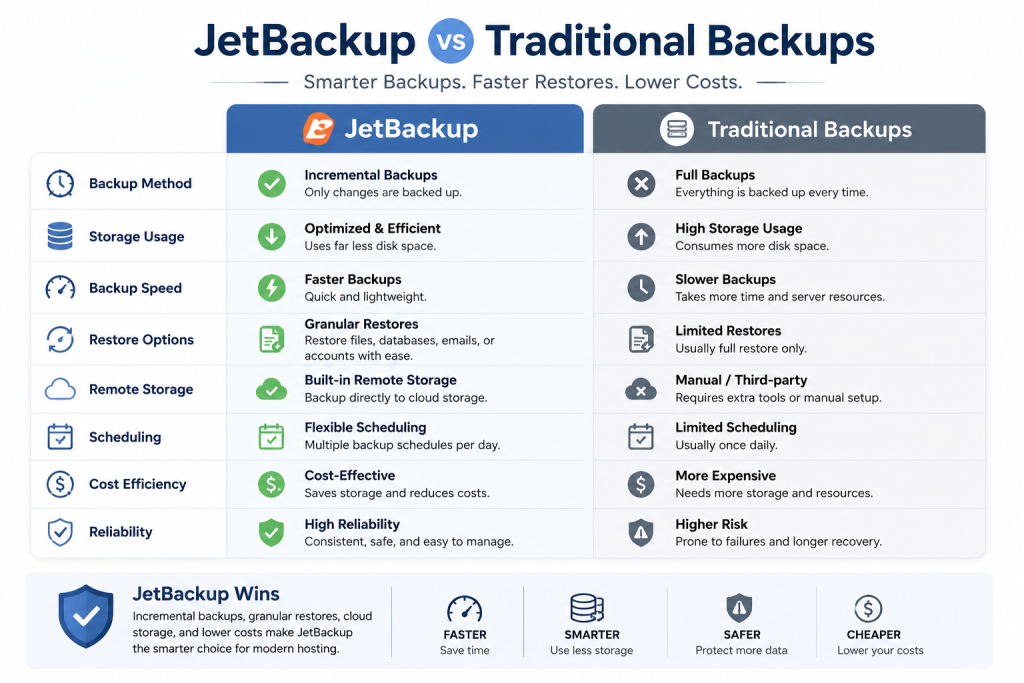
Traditional backups usually take a full copy of every file and every database, every single time they run. On the first night, that makes sense. But on night two, they copy everything again — even though 99% of the data has not changed since yesterday. By the end of a week, you have seven near-identical copies of the entire server eating up storage. This approach is simple to understand, but it wastes huge amounts of disk space, takes a long time to run, and puts heavy load on the server while it copies all that data. During a big backup job, your customers’ sites can slow down.
JetBackup uses incremental backups, which is a completely different idea. The first backup is a full copy, just like the old way. But every backup after that only copies the files and database rows that have changed since the last run. If a customer edits one image, JetBackup saves only that image — not their entire site again. This means backups finish in a fraction of the time, use a fraction of the storage, and barely touch the server’s resources. Your customers never notice the backup is even running.
The difference is dramatic. A traditional backup of a busy server can take hours and consume hundreds of gigabytes of extra space every week. JetBackup does the same job in minutes and adds only what is genuinely new. For a hosting provider with many accounts, this is the difference between manageable and impossible.
2. Storage, Cloud Integration, and Disaster Recovery
Where you store your backups is just as important as how you make them. Keeping your only backup copy on the same server as the live data is a disaster waiting to happen — if the server’s drive fails, both the site and the backup are gone together.
Traditional backups often live on a second local drive or an FTP server somewhere. This protects against file deletion, but it does not protect against bigger disasters like a full server failure, a data center problem, or ransomware that encrypts everything on the machine. Local backups are also limited by the size of the drive, which forces hosts to keep fewer backup versions.
JetBackup shines here. It is built to send backups straight to cheap cloud storage providers like Amazon S3, Wasabi, Backblaze B2, Google Cloud, and Dropbox. This means your backups live far away from your main server, safe from hardware failure and local attacks. Cloud storage is also very affordable, so you can afford to keep many versions of each backup — daily, weekly, and monthly — without breaking the bank. If your entire server disappears tomorrow, your data is still sitting safely in the cloud, ready to restore onto a new machine.
This is what real disaster recovery looks like. It is not just about having a backup; it is about having a backup that survives the same event that destroyed the original. Off-site, incremental, multi-version backups are the gold standard, and JetBackup makes them easy.
सर्वर लाइसेंस पर सबसे अच्छी कीमत चाहिए?
तुरंत डिलीवरी और 24/7 सहायता के साथ cPanel, DirectAdmin, LiteSpeed और अधिक पाएं।
3. Restore Speed and Everyday Reliability
Making a backup is only half the job. The other half — the half that actually matters when a customer is panicking — is how fast and easily you can restore it.
Traditional restores are painful. Because each backup is a giant full copy, restoring means hunting through big archive files, extracting the right one, and moving all that data back into place. It can take a long time, and during that time the customer’s site stays down. Restoring a single file or a single email often means unpacking a huge archive just to find it.
JetBackup makes restores fast and flexible. Because it tracks every file and its history, you can restore exactly what you need with a few clicks. A customer deleted one folder by mistake? Restore just that folder. A database got corrupted? Roll back just that database to last night’s version. Need to move a whole account to a new server? JetBackup can migrate it cleanly. You can even let customers restore their own files from inside cPanel, which cuts your support tickets dramatically.
Other reliability advantages of JetBackup include:
- Scheduled, hands-off backups that run quietly in the background.
- Multiple destinations, so the same backup goes to more than one place for extra safety.
- Backup hooks and validation that warn you if a backup did not complete correctly.
- Account-level and server-level restores, giving you total flexibility in an emergency.
For hosting providers, the verdict is clear. JetBackup is faster to run, cheaper to store, and far easier to restore than traditional backups. It turns one of the most stressful parts of hosting into something you barely have to think about.
4. Cost Comparison and Which Backup Strategy Fits You
By now the technical advantages of JetBackup are clear, but every host also has to think about the bottom line. Let’s compare the real costs and look at how to choose the right backup strategy for your specific situation, because the best choice depends on your size, budget, and customers.
The true cost of traditional backups. Traditional full backups seem free if you already own a second drive, but they carry hidden costs. The storage grows quickly — keeping daily full backups for a month can consume ten or more times the size of your live data. That forces you to buy larger drives, keep fewer backup versions, or delete history sooner than you’d like. There is also the cost of server load: heavy backup jobs slow down customer sites, which leads to complaints and support tickets. And because traditional backups usually live on the same machine or a single local destination, you remain exposed if that hardware fails.
The cost of JetBackup. JetBackup does require a license, which is a monthly fee. But that fee is often offset almost immediately by the storage you save. Because incremental backups only copy changes, you can keep weeks or months of history in a fraction of the space. Pair it with low-cost object storage like Wasabi or Backblaze B2 — which charge just a few dollars per terabyte — and your total backup cost often ends up lower than running bulky local backups, even after the license fee. For most growing hosts, JetBackup is actually the cheaper option over time.
Which strategy fits your situation?
- Solo site or hobby server: If you run one personal site or a tiny server with a handful of accounts, a simple traditional or free backup to a second location may be enough. The stakes and the volume are low.
- Small but growing host: Once you have paying customers, you owe them proper protection. JetBackup (or a similar incremental tool) becomes worth it the moment data loss would cost you money or reputation.
- Shared hosting provider: There is no real debate — an incremental, multi-destination solution like JetBackup is the standard. The storage savings, restore speed, and customer self-service restore options pay for themselves fast.
- Enterprise or compliance-driven: You need multiple off-site copies, long retention periods, and tested restores. Incremental backups plus cloud storage plus a second region is the responsible setup.
The bottom line on cost is that traditional backups are cheap to start but expensive to scale, while JetBackup costs a small license fee but saves you money as you grow through dramatically lower storage and labor costs.
Protect Your Customers and Your Peace of Mind
Backups are not a place to cut corners. The difference between a good backup system and a bad one is the difference between a quick recovery and a lost customer. Traditional full backups served the industry for years, but they are slow, bulky, and risky compared to modern incremental tools. JetBackup is simply the better way.
At SharedLicense, we help hosting providers run the best tools for less. We offer affordable JetBackup licenses along with cPanel, DirectAdmin, LiteSpeed, CloudLinux, Imunify360, and the rest of a professional hosting stack.
Ready to make your backups faster, safer, and cheaper? Join SharedLicense today and check out our software license services. Sleep better knowing your data — and your customers’ data — is fully protected.
