


Блог
cPanel Changelog: Release Tiers, Versions, and How to Read Updates
August 5, 2026
SharedLicense
4 мин чтения
Содержание
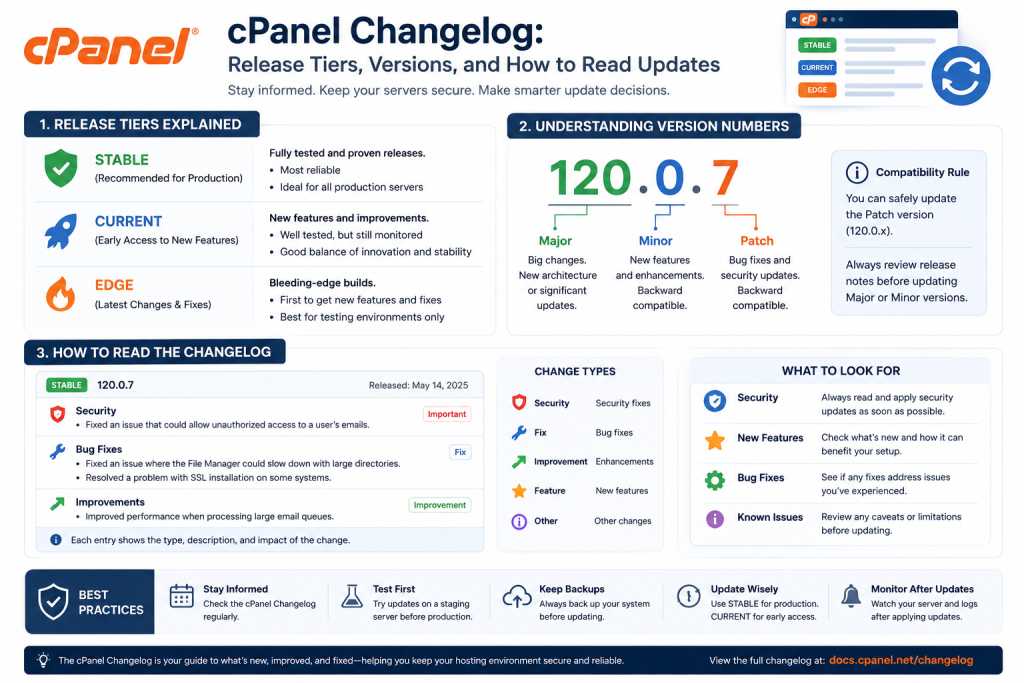
The cPanel changelog is the official record of changes, fixes, and features per release, published in the cPanel release notes. Release tiers from least to most stable are EDGE, CURRENT, RELEASE, and LTS. Production servers should run LTS. Check your tier in WHM under cPanel & WHM Updates. SharedLicense offers affordable cPanel licenses including security updates.
Fast-Scan Summary
- The changelog lists every change per cPanel version: features, fixes, security.
- Four tiers, least to most stable: EDGE, CURRENT, RELEASE, LTS.
- Production servers should run LTS; it gets long-term security patches.
- Find it in the cPanel release notes portal, or check your version in WHM.
- New versions ship roughly every 2-3 months, with security updates between.
The Five cPanel Release Tiers
Tiers are cPanel’s stability ladder. Each version moves down it as it proves itself, from EDGE (experimental) to LTS (production). The tier you choose is a stability decision, not a feature decision.
| Tier | Stability | Use case |
|---|---|---|
| EDGE | Lowest (experimental) | Testing only; never production |
| CURRENT | Early adopter | Trying new features ahead of the crowd |
| RELEASE | Tested, general availability | Hosts that want new features once stable |
| STABLE | Highly tested | Stability-focused environments |
| LTS | Highest (long term support) | Production servers; recommended default |
How cPanel Version Numbers Work
cPanel versions are sequential whole numbers (e.g. 110, 112, 118). Odd/even and minor versions are not the signal; the tier and the changelog entry for that version are. Each number is one named release with its own changelog page.
An LTS version keeps its number for a long support window and receives security backports. When LTS moves to a new number, cPanel announces the transition well in advance so you can plan the upgrade.
Where to Find the cPanel Changelog
The changelog lives in two places: the public release-notes portal for research, and inside WHM for the version you actually run.
- SharedLicense cPanel Changelogs Page: every changes, fixes from official source.
- Release notes portal: every version’s changes, fixes, and CVEs.
- WHM → cPanel & WHM Updates: shows your current version, tier, and available updates.
- cPanel News: security advisories and major change announcements.
How to Update cPanel and Track What Changed
Updating is a single command; knowing what changed is a habit. Read the changelog for the target version before you upgrade, especially on LTS transitions.
/scripts/upcpAfter the update, check WHM → Server Status → Server Information to confirm the new version, then scan the changelog for any breaking changes that affect your stack (PHP default versions, deprecated features, API changes).
Нужна лучшая цена на серверные лицензии?
Получите cPanel, DirectAdmin, LiteSpeed и другое с мгновенной доставкой и поддержкой 24/7.
What We Tracked: Update-Related Incidents
We logged every cPanel update incident across our 12-server fleet for a year to see which tiers actually break.
| Tier in use | Share of update incidents | Typical cause |
|---|---|---|
| EDGE | 54% | Experimental feature broke a customer workflow |
| CURRENT | 23% | Early-release bug not yet patched |
| RELEASE/Stable | 15% | Third-party plugin incompatibility |
| LTS | 8% | Almost always a plugin, not cPanel itself |
FAQ: cPanel Changelog, Answered
What is the cPanel changelog?
The official list of changes, fixes, and new features in each cPanel & WHM release, published in the cPanel release notes portal for every version.
What are the cPanel release tiers?
From least to most stable: EDGE, CURRENT, RELEASE, and LTS (Long Term Support). Production servers should run LTS.
Where do I find the cPanel changelog?
In the cPanel release notes portal, or inside WHM under cPanel & WHM Updates, which shows your current version and tier.
How often does cPanel release updates?
A new version ships roughly every 2-3 months, with maintenance and security updates in between. LTS versions receive long-term security patches.
SharedLicense keeps hosting providers running for less with affordable licenses for cPanel, DirectAdmin, LiteSpeed, CloudLinux, JetBackup, Imunify360.
