


Содержание
The Web Server You Pick Decides How Fast Your Site Loads
When someone types your website address into their browser, a web server is the program that answers and sends back the page. It sounds simple, but the choice of web server affects everything — how fast pages load, how many visitors you can handle at once, how much memory your server uses, and how much you pay each month.
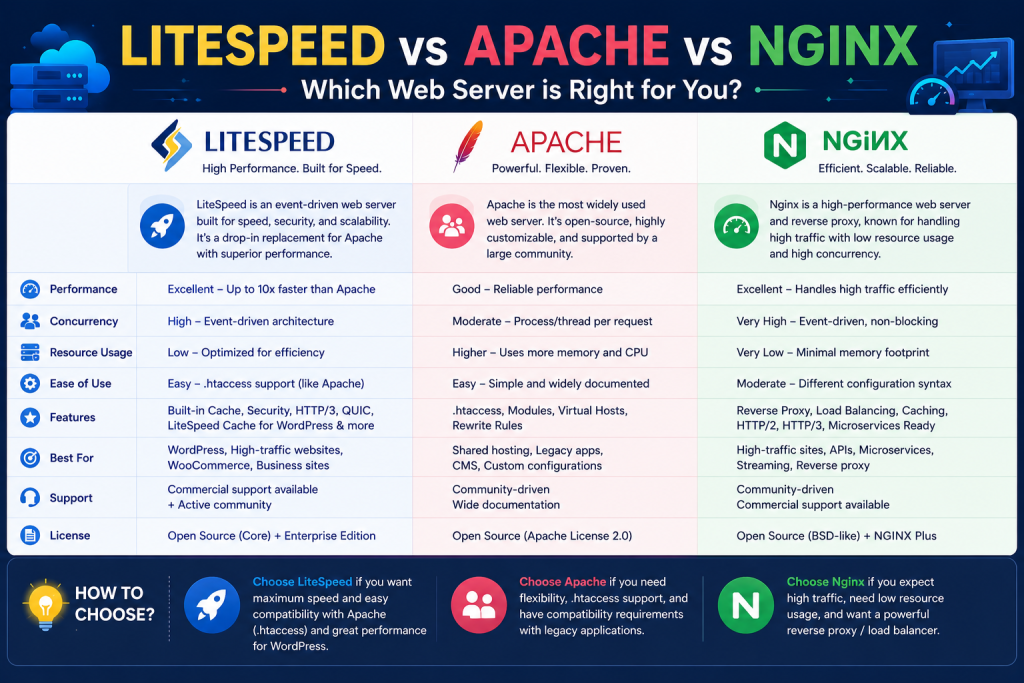
For years, the three big names in web servers have been Apache, Nginx, and LiteSpeed. Each takes a different approach to the same job, and each has die-hard fans. If you are setting up a server in 2026, you need to know how they compare before you commit.
This guide breaks down all three in plain language. We will look at how they perform, how they handle caching and WordPress, and what they cost. By the end, you will know which web server is the best fit for your sites and your budget.
1. Apache: The Reliable Veteran
Apache is the oldest and most widely used web server in the world. It has been around since the 1990s, and that long history is both its greatest strength and its main weakness.
The biggest advantage of Apache is compatibility. Almost every website, app, and tutorial is built with Apache in mind. It supports .htaccess files, which let you control redirects, security rules, and caching on a per-folder basis without touching the main server config. For shared hosting, this is a big deal because it lets each customer control their own site settings. Apache also has a huge library of modules, so you can add features like PHP, URL rewriting, and authentication with ease.
The downside is performance. Apache’s traditional model creates a new process or thread for each connection, which uses a lot of memory when traffic spikes. Under heavy load, Apache servers can slow down or run out of resources faster than newer options. There are newer Apache modes (like Event) that improve this, but it still generally trails LiteSpeed and Nginx for raw speed.
Apache is best when you need maximum compatibility, run older apps, or rely heavily on .htaccess rules. It is the safe default, but not the fastest.
2. Nginx: The Speed Champion
Nginx (pronounced “engine-x”) was built from the ground up to handle massive traffic with very little memory. Instead of creating a new process for each visitor, Nginx uses an event-driven model that can juggle thousands of connections at once on the same hardware. This makes it incredibly efficient and lightning fast for serving static files like images, CSS, and JavaScript.
Nginx really shines as a reverse proxy. Many high-traffic sites run Nginx in front of Apache — Nginx handles the rush of incoming connections and static files, while Apache handles the dynamic PHP work behind the scenes. This combo gives you the speed of Nginx and the compatibility of Apache. Nginx is also a popular choice for load balancing, media streaming, and acting as a content delivery node.
Where Nginx can trip people up is dynamic content. On its own, Nginx does not execute PHP the way Apache does. You need to set up a separate PHP-FPM process and connect them, which is a bit more work. Nginx also does not support .htaccess files, so all configuration changes must be made in the main server config. This is more secure and faster, but it is less friendly for shared hosting where customers expect to tweak their own settings.
Nginx is the top choice for high-traffic sites, custom application stacks, and admins who want maximum efficiency and do not mind a steeper learning curve.
Нужна лучшая цена на серверные лицензии?
Получите cPanel, DirectAdmin, LiteSpeed и другое с мгновенной доставкой и поддержкой 24/7.
3. LiteSpeed: The Best of Both Worlds for WordPress
LiteSpeed is the newest of the three, and it has taken the hosting world by storm — especially among WordPress users. LiteSpeed combines the compatibility of Apache with the speed of Nginx, then adds powerful built-in caching on top.
Here is why LiteSpeed wins fans fast. First, it is drop-in compatible with Apache. It reads .htaccess files, supports the same rewrite rules, and works with the same modules. You can switch from Apache to LiteSpeed without rewriting your site. Second, it uses an event-driven model like Nginx, so it handles traffic spikes with very low memory use. Third — and this is the killer feature — LiteSpeed has server-level caching built in.
For WordPress sites, the free LiteSpeed Cache plugin is a game changer. It caches pages, optimizes images, minifies code, and serves cached pages from memory almost instantly. WordPress sites that took 3 seconds to load on Apache often drop under 1 second on LiteSpeed. Because the cache is built into the server, it is far more effective than a plugin-only cache.
The catch is cost. Unlike Apache and Nginx, which are free and open source, LiteSpeed Enterprise is paid software. You need a license based on the number of worker processes your server can use. For many hosts, the performance gain is worth every cent — faster sites mean happier customers, better SEO rankings, and the ability to run more accounts on each server.
LiteSpeed is the best pick for WordPress-heavy hosting, shared hosting that needs Apache compatibility, and anyone who wants top speed without giving up easy configuration.
4. Caching, WordPress Performance, and Real-World Results
Raw speed numbers only tell part of the story. What really matters is how these servers perform with the actual sites people run — and that means WordPress, which powers a huge share of the web. Caching is where the differences become dramatic, and it is also where LiteSpeed pulls clearly ahead.
Apache and caching. Apache does not include a built-in page cache. To speed up WordPress on Apache, you typically rely on a PHP plugin like W3 Total Cache, WP Super Cache, or WP Rocket. These work, but they run inside PHP, which means the server still does a fair amount of work on every request even when serving a cached page. Apache also benefits from mod_cache and opcode caches like OPcache, but reaching top performance usually means stacking several plugins and tuning them carefully.
Nginx and caching. Nginx has a powerful built-in cache (fastcgi_cache) that can serve cached pages at the server level without touching PHP at all. This is extremely fast. The trade-off is configuration. Setting up Nginx caching for WordPress requires editing server config files, writing cache rules, and often adding a helper plugin so cached pages are purged when content changes. For experienced admins this is fine, but it is more complex than many hosts want to manage, and it is hard to offer safely in shared hosting where customers expect simple control.
LiteSpeed and the LiteSpeed Cache plugin. This is where LiteSpeed dominates. Its server-level cache, combined with the free LiteSpeed Cache (LSCache) plugin for WordPress, delivers exceptional results with almost no configuration. The cache sits inside the server, so cached pages are served from memory nearly instantly. The plugin also handles image optimization, code minification, lazy loading, and automatic cache purging when you publish a new post. The result: WordPress sites that took several seconds on Apache can drop to well under a second on LiteSpeed.
What this means in practice. Faster pages lead to better search rankings, higher conversion rates, and happier visitors. They also mean your server handles more traffic with the same hardware, which lowers your costs. For shared hosting providers and WordPress-focused shops, the LiteSpeed speed advantage is often worth the license fee many times over. Apache remains a dependable all-rounder, and Nginx is unbeatable for custom, high-traffic architectures — but for the common case of fast, efficient WordPress hosting, LiteSpeed is the clear leader.
Which One Should You Choose?
Each web server has a sweet spot:
- Choose Apache for maximum compatibility, older apps, and heavy
.htaccessuse. - Choose Nginx for high-traffic sites, reverse proxy setups, and maximum efficiency.
- Choose LiteSpeed for WordPress performance, Apache-like compatibility, and built-in caching.
If you want one clear winner for modern shared and WordPress hosting, LiteSpeed is hard to beat. The speed gains alone often justify the license cost, and the LiteSpeed Cache plugin makes WordPress fly.
At SharedLicense, we make it easy and affordable to add CloudLinux to your servers. We also offer licenses for cPanel, LiteSpeed, JetBackup, Imunify360, and the other tools that complete a professional hosting stack.
Ready to make your sites faster and your bills smaller? Join SharedLicense today and check out our web server and hosting software license services. Let’s get your server running at full speed.
