


Blog
Comparison of Plesk and CPanel; Which is more suitable for you?
Table of Contents
We start comparing Plesk and cPanel by measuring their popularity in the world. cPanel is used in more than 7.3% of the world’s websites; While the usage rate of Plesk control panel is 4.6% of websites all over the world. Although cPanel seems to be more popular, this statistic is not the whole story. In this article, we will compare Plesk and cPanel completely and accurately. By reading this article, you can get the answer to your question about choosing cPanel or Plesk control panel.
Comparison of Plesk and CPanel; What is their main difference?
The key to comparing Plesk and cPanel comes back to their user interface and servers. The Plesk user panel is similar to the WordPress management section and you can use it on both Linux and Windows servers. cPanel has a graphical interface but is only compatible with Linux servers. Let’s have an overview of them:
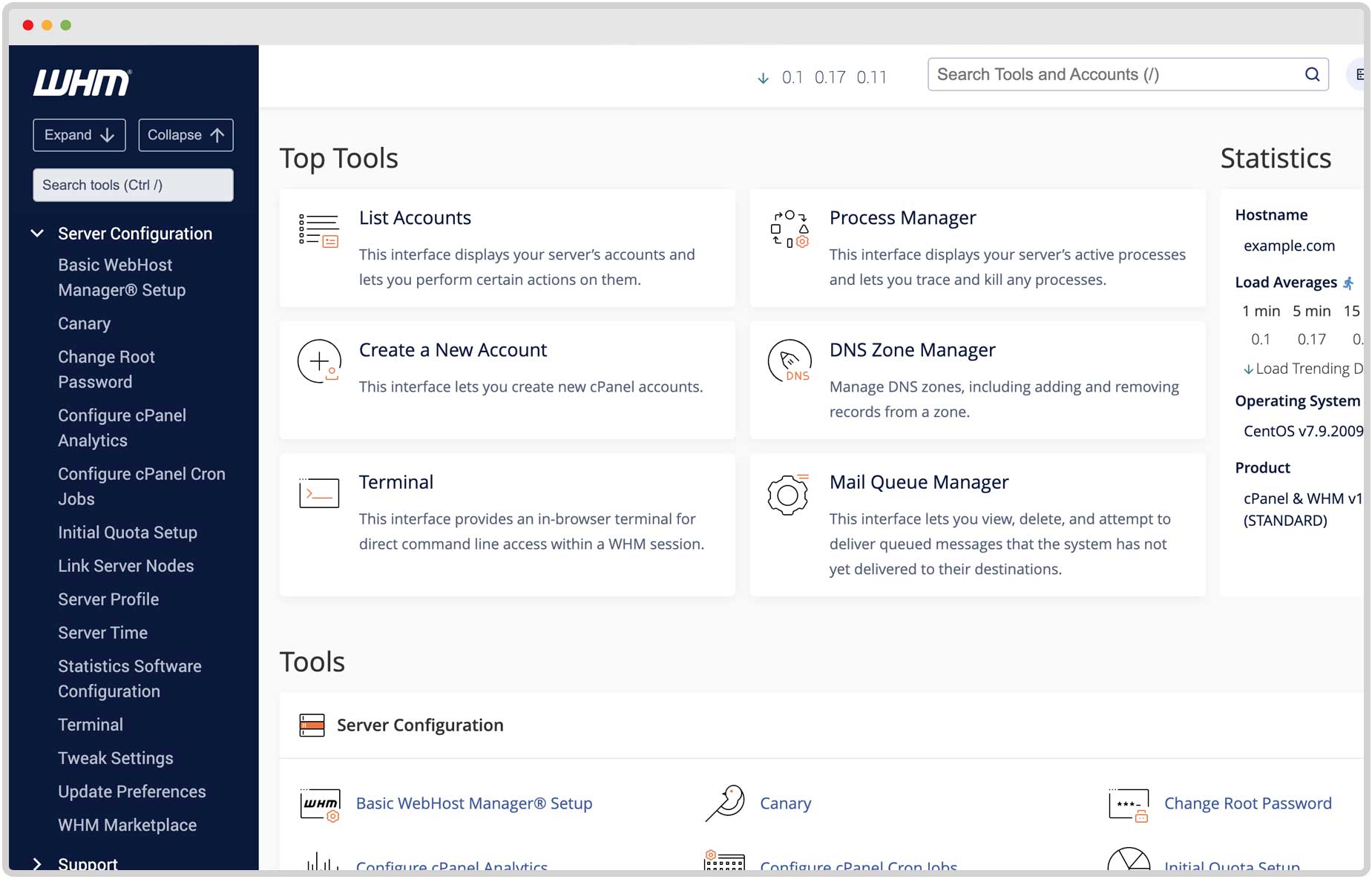
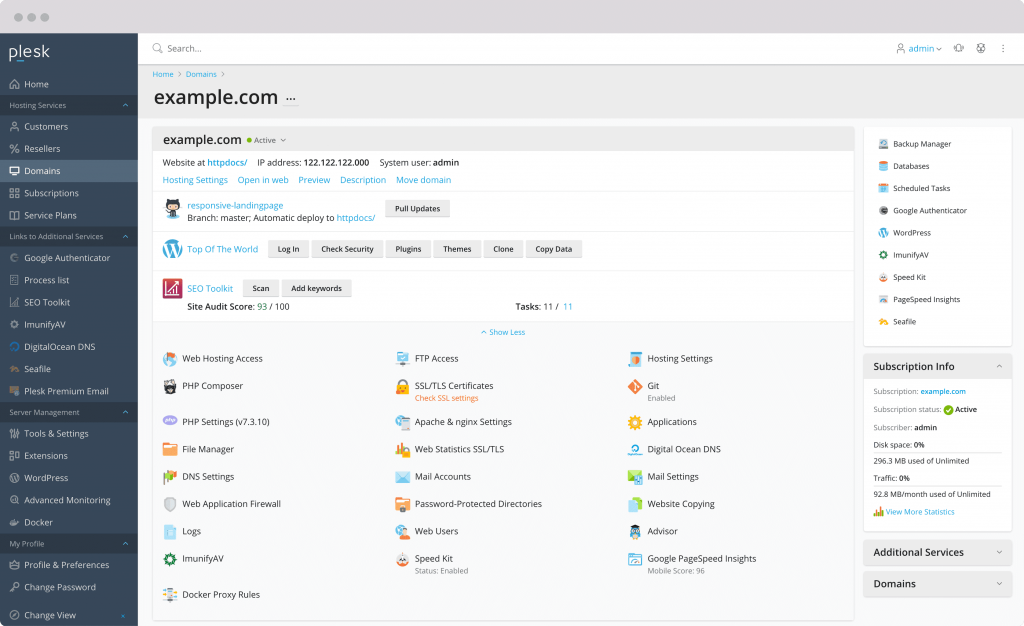
Comparison of CPanel and Plesk in terms of user interface
Imagine entering your hosting user panel and facing a space similar to WordPress management. This is the user experience that Plesk offers you with its modern and user-friendly interface. Plesk uses modern JavaScript technology to provide users with a simple yet powerful control panel. Whether you are a novice or a professional, thanks to Plesk’s smooth and user-friendly interface, you will easily find every part you need.
CPanel is also a suitable option for users who like graphical user interface. In cPanel for Linux, each item is grouped into separate sections. Email, security, software, programs, etc. all have specific sections in your management panel. This category helps you to find each section easily. In addition, CPanel gives you the possibility to customize the dashboard and you can adjust the layout of the sections according to your needs.
In a word, if you are looking for an organized control panel with more manageability and control, CPanel is a good option. If you are looking for a user-friendly and simple interface, Plesk will meet your needs.
What is cPanel?
We are going to compare Plesk control panel and CPanel in terms of features and management tools. If WordPress security is a priority for you, Plesk is a great choice. This control panel with the ability to “secure WordPress with one click” makes you feel at ease about possible attacks.
Unlike cPanel, which currently only works with Linux, Plesk is compatible with almost any operating system. Whether you have a Linux server or a Windows server, Plesk is easily installed on it. Also, if you are a fan of Docker containers, Plesk will not disappoint you. With the support of more than 200,000 Docker images on Linux, you can easily use this powerful technology to manage your software. More interestingly, it is possible to launch these containers directly from the Plesk panel.
On the other hand, cPanel takes the first word in terms of installation speed. Installing and setting up cPanel together with WHM (hosting management panel) is done in less than 5 minutes and you can quickly start your work with hosting. CPanel has raised the level of protection for users by adding Imunify360 to its security system.
Also, with SpamBox enabled by default in new accounts, you will be relieved of unwanted emails. Plesk is a better choice if you are using Nginx web server. Currently cPanel is only compatible with Apache web server.
Comparison of Plesk and cPanel in terms of security
In examining the difference between cPanel and Plesk, we have to say that both Plesk and cPanel control panels leave no stone unturned in terms of security and make you feel at ease.
Check security in Plesk
Plesk benefits from powerful security plugins such as Immunity 360, Fail2ban intrusion prevention system and integration with Active Directory. These plugins come in free and paid versions.
Plesk security key features
Check security in cPanel
Some of the most popular cPanel security plugins include auto-issuing SSL certificates, blocking IP addresses, and password-protecting folders.
Key security features of cPanel
Comparison of Plesk and cPanel in terms of operating system
An important technical difference between Plesk and cPanel is the operating systems they run on. In this competition, Plesk is more flexible and compatible with Linux and Windows. Operating systems supported by Plesk include the following:
This is despite the fact that cPanel is a party It is considered a Linux bootloader and works only with this operating system. Operating systems that can be supported by cPanel include:
Need the best price on server licenses?
Get cPanel, DirectAdmin, LiteSpeed & more with instant delivery and 24/7 support.
As you can see, both control panels support popular Linux operating systems such as CentOS and Cloud Linux. But Plesk has a double advantage by being able to run on Windows Server.
Read everything about the Plesk control panel and its comparison with other control panels in the article below.
What is Plesk?
Comparison of Plesk and cPanel in terms of cost
In examining the difference between Plesk control panel and CPanel, both CPanel and Plesk have different price plans based on their services. Be sure to carefully check the description of each plan before purchasing to make sure you choose the right option.
Comparison of Plesk and CPanel in terms of backup
Next, let’s see the differences between Plesk and CPanel backup:
Backup in Plesk
Plesk offers two types of backups:
Using incremental backups minimizes the backup operation time and the disk space occupied by the backup files. These backups can be stored in Plesk internal storage or external FTP storage.
Key features:
Backup in cPanel
cPanel offers three types of backup:
Key features:
If you need frequent backups and save space, Plesk is a better option with incremental backups and external storage space; Therefore, it is better to migrate from cPanel to Plesk. If ease of recovery and a simple user interface are your priorities, cPanel is a more appropriate choice with various backups and automatic saving capabilities.
Scripting languages in Plesk and cPanel
Most users will have no problem choosing between Plesk or cPanel in terms of the number of scripting languages supported. However, here is a list of scripting languages that each control panel supports:
cPanel scripting languages
Plesk scripting languages
Ultimately, your use of a particular scripting language can influence your decision. So check out these lists to see which control panel is easier to use for the languages you plan to use.
All kinds of control panels
Comparison of Plesk and cPanel in terms of speed
Before you make a final decision, consider the ease of use of each control panel. Whether in Plesk or cPanel, it’s easy to find the tools you need. cPanel has managed to reduce the amount of RAM used so that your site loads faster; As a result, account setup and task management have become faster. cPanel also focuses more on improving site performance. While the weakness of Plesk is that the account creation and management sections load noticeably slowly. In this situation, you may need to migrate from Plesk to cPanel.
Which control panel is better Plesk or cPanel
The hosting management panel plays an important role in how you interact with the server. This panel gives you access to the features you need for your project.
Unparalleled speed and stability of web hosting in Pars Pack cloud hosting
