


Inhaltsverzeichnis
A Fresh Server Is a Blank Canvas — Here Is What to Install First
When you get a new VPS or dedicated server, it usually arrives almost empty. Just an operating system and a blinking command line. From there, it is up to you to turn it into a machine that can host websites, fight off hackers, back up data, and recover quickly when something goes wrong. The software you choose to install is what separates a shaky, slow server from a fast, secure, reliable one.
Whether you are setting up your first server or your fiftieth, there is a short list of tools that every serious server should have. These are the workhorses of the hosting world — battle-tested software that providers rely on every single day. Skipping any of them usually means more downtime, more support tickets, and more headaches down the road.
This guide covers the top 10 essential software tools for a VPS or dedicated server in 2026, and explains in simple terms why each one matters.
1. The Core: Control Panel, Web Server, and OS Layer
These first tools form the foundation of your server. Everything else builds on top of them.
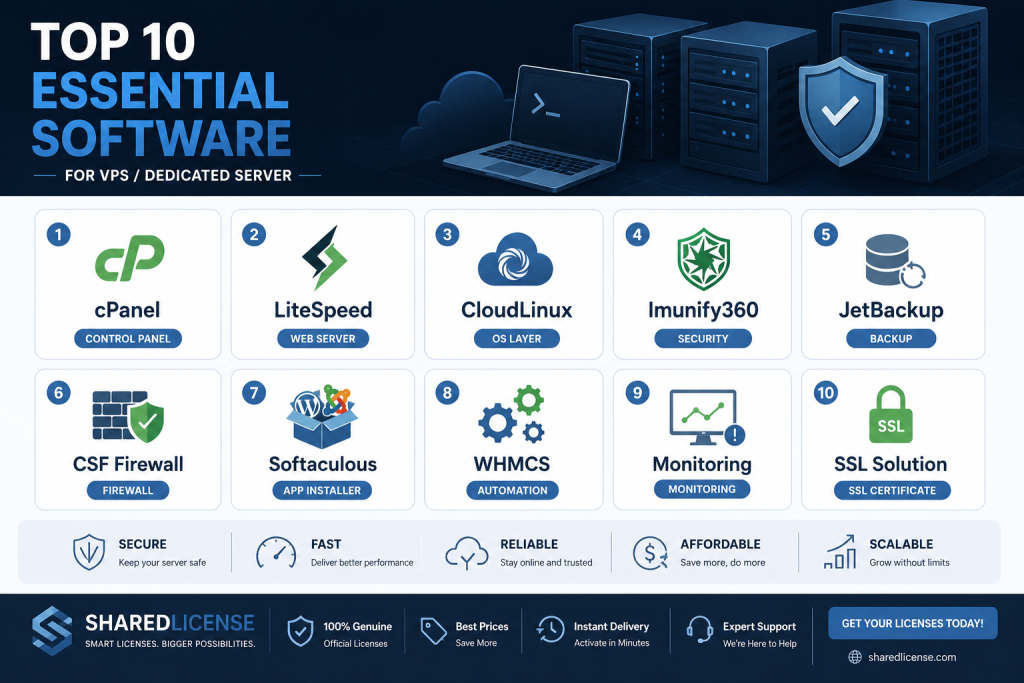
1. cPanel (or DirectAdmin) — Your Control Panel. A control panel is the dashboard you use to manage websites, email, DNS, and files without typing commands all day. cPanel is the industry standard, loved for its familiar interface and huge ecosystem. DirectAdmin is the budget-friendly alternative with flat pricing and lower resource use. Either way, a control panel turns a raw server into something you (and your customers) can actually use.
2. LiteSpeed — Your Web Server. The web server is what delivers your pages to visitors. LiteSpeed is the top choice for speed and efficiency. It uses far less memory than Apache, handles traffic spikes with ease, and its built-in caching makes WordPress sites load in a flash. If you want fast sites and happy customers, LiteSpeed is one of the best upgrades you can make.
3. CloudLinux — Your OS Layer for Shared Hosting. If more than one customer lives on your server, CloudLinux is essential. It isolates each account with its own resource limits and a secure cage, so one bad site cannot slow down or threaten the others. It also lets each account pick its own PHP version, which prevents a flood of “my site broke” tickets. For shared hosting, CloudLinux is the difference between chaos and calm.
2. Security and Backups: Protect Your Data and Your Sleep
A fast server that loses its data or gets hacked is worthless. This second group of tools keeps your server safe and makes sure you can always recover.
4. Imunify360 — Your Security Shield. Imunify360 is an all-in-one security suite built for hosting servers. It combines a firewall, intrusion detection, malware scanning, and proactive defense against attacks. It blocks brute-force login attempts, quarantines infected files, and stops known malware before it spreads. For shared hosting, where you cannot control what customers upload, Imunify360 is one of the smartest investments you can make.
5. JetBackup — Your Backup Lifeline. Backups are the one thing you never skip. JetBackup is the modern favorite because it uses incremental backups — it only copies what has changed, which saves huge amounts of storage and time. It can send backups to cheap cloud storage and restore a single file or an entire account in a few clicks. When disaster strikes (and eventually it will), JetBackup is what saves your business.
6. ConfigServer Firewall (CSF) — Your Server Guard. CSF is a free, powerful firewall that locks down your server’s network. It blocks suspicious IP addresses, limits login attempts, and gives you a clear view of what is connecting to your machine. While cPanel servers often include CSF by default, it is worth checking on any server to make sure your ports are protected.
Sie brauchen den besten Preis für Serverlizenzen?
Erhalten Sie cPanel, DirectAdmin, LiteSpeed und mehr mit sofortiger Lieferung und 24/7-Support.
3. Apps, Monitoring, and the Rest of the Stack
The last set of tools makes life easier for you and your customers, and keeps you informed about how your server is doing.
7. Softaculous — One-Click App Installer. Customers love installing WordPress, Joomla, Drupal, and hundreds of other apps with a single click. Softaculous makes that possible. It also keeps those apps updated automatically, which closes security holes before attackers find them. Offering one-click installs is now a basic expectation, and Softaculous is the tool that delivers it.
8. WHMCS — Billing and Automation. If you sell hosting, WHMCS handles everything — orders, invoices, payments, account creation, and renewal reminders. It connects to your control panel so new accounts are created automatically the moment a customer pays. WHMCS turns a server into a real business.
9. A Monitoring Tool — Your Early Warning System. You cannot fix a problem you do not know about. A monitoring tool like Netdata, Nagios, or even UptimeRobot watches your server around the clock. It alerts you the moment CPU spikes, a service stops, or your site goes offline. Fast alerts mean fast fixes and minimal downtime.
10. A Reliable SSL Solution — AutoSSL or Let’s Encrypt. Every site needs HTTPS now, both for security and for search rankings. AutoSSL (built into cPanel) and Let’s Encrypt issue free, automatic certificates that renew themselves. With these tools, every customer gets a secure site with zero extra work.
4. How to Install and Manage Your Stack Without Breaking the Bank
Knowing which tools you need is half the battle. The other half is actually getting them installed, configured, and kept up to date without spending a fortune or losing your weekends. The good news is that modern hosting software is designed to work together, and there are smart ways to handle licensing that keep your costs predictable.
Install in the right order. When you set up a new server, follow a logical sequence. Start with a clean operating system like AlmaLinux. Add your control panel (cPanel or DirectAdmin) first, because it lays the groundwork for everything else. Then layer on LiteSpeed, CloudLinux, and your security tools, since these integrate directly with the control panel. Finish with JetBackup, Softaculous, and WHMCS. Installing in this order avoids version conflicts and makes configuration much smoother. Most of these tools offer one-click installers that handle the heavy lifting for you.
Automate updates and maintenance. A server is never “set and forget.” Security patches arrive constantly, and falling behind leaves you exposed. Turn on automatic updates for your operating system where it is safe to do so. Use your control panel’s built-in update manager to keep cPanel, LiteSpeed, and other software current. Schedule JetBackup to run on a fixed schedule so your backups happen without anyone remembering. The more you automate, the fewer late-night emergencies you face.
Be smart about licensing costs. This is where many hosts overspend. Each tool on this list carries a monthly license fee, and buying them all at full retail price can cost more than the server itself. That is why so many providers turn to a trusted license supplier who can bundle these tools at a lower combined rate. The software works exactly the same way and updates normally — you simply pay less for the same professional stack. Look for a provider who offers cPanel, DirectAdmin, LiteSpeed, CloudLinux, JetBackup, Imunify360, Softaculous, and WHMCS so you can manage all your licenses in one place.
Keep an eye on the whole system. Once everything is running, your monitoring tool becomes your best friend. Set up alerts for high load, low disk space, failed services, and offline websites. Review your logs weekly for unusual activity. Check that your backups are completing successfully and occasionally perform a test restore to confirm they actually work — a backup you have never restored is a backup you cannot fully trust.
With the right tools, sensible automation, and affordable licensing, a well-managed server runs quietly in the background and lets you focus on growing your business instead of putting out fires.
Build Your Stack the Smart Way
These ten tools cover the full picture: a control panel to manage, a fast web server to serve, an OS layer to isolate, security to protect, backups to recover, and apps and monitoring to keep everything running. Together, they turn a blank server into a professional hosting platform.
The challenge is that each of these tools comes with a license fee, and those fees can add up to more than the cost of the server itself. That is exactly the problem SharedLicense solves. We also offer licenses for cPanel, LiteSpeed, JetBackup, Imunify360, Softaculous, WHMCS, and more — all in one place.
Ready to build your server the smart way? Join SharedLicense today and check out our full range of software license services. Get every tool you need, at a price that actually makes sense.
