


Blog
CloudLinux LVE Limits Explained
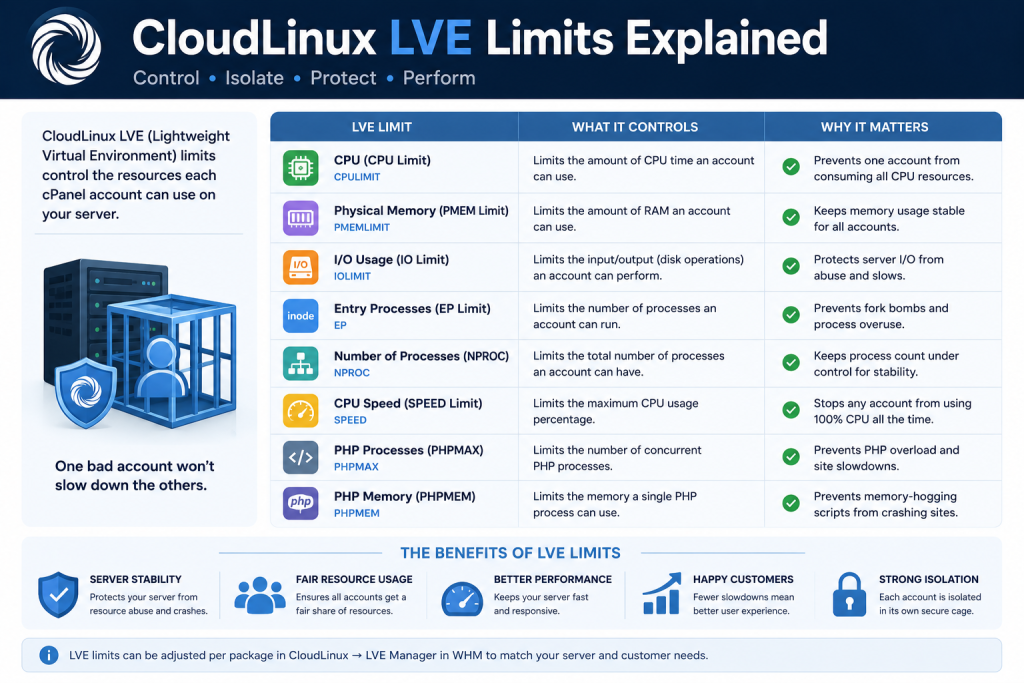
Table of Contents
CloudLinux LVE Limits Explained: A Practical Guide for Hosting Providers
Fast-Scan Summary
- LVE limits are per-account caps set in WHM under LVE Manager, applied by plan.
- CPU limit is measured in percentage points of one core; 100 = one full core. The default plan usually grants 100 CPU with 400 burst.
- IO limit throttles disk throughput in MB/s and prevents one account from saturating the disk array.
- EP (entry processes) caps concurrent requests, stopping single-script spikes from killing the box.
- PMEM and Vmem are memory limits; hitting PMEM triggers a forced reset after a short grace period.
- Burst (TTL) values let an account spike above its limit for a defined number of seconds before throttling kicks in.
What Is an LVE and Why CloudLinux Uses It
On a standard cPanel server without CloudLinux, a single runaway script can drive the load so high that every customer on the box suffers. That is the problem the LVE solves: it puts a hard ceiling on each account’s usage, so abuse is contained to the offender. CloudLinux does not limit what a site can do when it behaves; it limits what a site can take when it misbehaves.
Every LVE Limit, Explained
| Limit | What it caps | Unit | What happens when exceeded |
|---|---|---|---|
| CPU | Processor time | Percent of one core (100 = 1 core) | Account is throttled to the limit; site slows but stays online |
| IO | Disk read/write throughput | MB/s | Disk operations throttle to the limit, preventing disk-array saturation |
| EP (entry processes) | Concurrent PHP requests | Count | New requests queue or return 508 after the queue fills |
| nPROC | Total running processes | Count | No new processes start until some exit |
| PMEM | Physical memory per account | MB | After a short grace period, the account is reset and restart limited |
| Vmem | Virtual memory per account | MB | Same forced reset behavior as PMEM |
The distinction that matters most: CPU and IO throttle (the site slows down but keeps serving), while PMEM, Vmem, and process limits can stop or reset the site entirely. When a customer says “the site died,” it is almost always a memory or process limit, not a CPU limit.
Real-Time vs. Burst (TTL): The Two Numbers Per Limit
CloudLinux’s default plan sets CPU to 100 with a burst of 400 and a TTL of 60 seconds. In plain terms: the account is entitled to one core of continuous CPU, but it may spike to four cores for up to 60 seconds. This burst window absorbs the natural spikes of PHP and MySQL without throttling a healthy site.
Burst is a goodwill window, not an entitlement. If an account exceeds its burst for longer than the TTL, throttling kicks in and the site slows to the real-time limit until usage drops. Sites that constantly run at the burst ceiling are telling you the plan is undersized, not that CloudLinux is broken.
How to Read LVE Manager in WHM
To diagnose an account, open Home > CloudLinux > LVE Manager, select the account, and watch the live meters. The columns that matter:
- %CPU — current CPU use as a percentage of the real-time limit. Over 100% means the account is burst-throttled.
- IO — live disk throughput in MB/s against the IO limit.
- EP — current entry processes against the EP cap. A number pinned at the cap suggests a concurrency problem, usually a slow PHP worker or a bot flood.
- Memory — PMEM and Vmem use against their limits.
History lives in LVE Statistics, which aggregates usage over time. Size plans from this data: give an account the ceiling its 95th percentile actually uses, plus headroom for growth. Setting limits from a snapshot of a busy afternoon under-sizes the plan and guarantees tomorrow’s throttling complaint.
Need the best price on server licenses?
Get cPanel, DirectAdmin, LiteSpeed & more with instant delivery and 24/7 support.
Sizing LVE Limits Without Breaking Customers
Use this sizing order:
- Pull 30 days of LVE Statistics for the account.
- Note the peak CPU, IO, EP, and memory figures at the 95th percentile, not the all-time max.
- Set the real-time limit at or slightly above the 95th percentile.
- Set the burst value at roughly 2x to 4x the real-time limit, with a 30 to 60 second TTL.
- Set PMEM from the account’s observed top memory usage plus 20% to 30% headroom.
Remember the failure asymmetry: a site throttled on CPU still serves visitors, just slower. A site reset on PMEM goes offline. When in doubt about memory, size up; when in doubt about CPU, let the burst handle the spikes.
What We Tracked: LVE Limits Across 12 Servers
| Limit most commonly exceeded | Share of LVE tickets | Typical root cause |
|---|---|---|
| EP (entry processes) | 41% | PHP worker pool too small, bot flood, or an undiagnosed slow query holding workers |
| CPU | 27% | WordPress cron collisions and crawling bots |
| PMEM / Vmem | 21% | Memory leak in a plugin or a single oversized PHP request |
| IO | 11% | Backup jobs and import scripts running during peak hours |
The operational lesson: over 40% of our LVE tickets were EP, not CPU. Raising the CPU limit on those accounts would have done nothing. The fix was increasing the EP cap or fixing the slow query that was holding workers. Read the meter before you raise the number.
FAQ: CloudLinux LVE Limits, Answered
What is a CloudLinux LVE?
What are the CloudLinux LVE limits?
Does an LVE limit hurt a website?
How do I check LVE usage for an account?
Recommended Spoke Pages
These companion pages complete the CloudLinux topical silo for your site:
- CloudLinux vs. cgroup for hosting providers — candidate URL:
/cloudlinux-vs-cgroups/ - CloudLinux PHP Selector explained — candidate URL:
/cloudlinux-php-selector/ - CloudLinux vs CageFS isolation — candidate URL:
/cloudlinux-cagefs/ - What is a CloudLinux license worth — candidate URL:
/cloudlinux-license-pricing/
Related Guides
- Common cPanel errors and fixes
- cPanel license renewal guide
- LiteSpeed vs Apache for cPanel hosts
- JetBackup best practices
The Bottom Line
CloudLinux LVE limits are a simple idea executed precisely: cap each account’s CPU, IO, memory, and processes so one customer cannot sink a server. Read LVE Manager before changing anything, size plans from 30-day history at the 95th percentile, and remember the asymmetry — CPU throttles, memory resets. Get the limits right and your server keeps every customer online.
At SharedLicense, we keep hosting providers running for less with affordable licenses for CloudLinux, cPanel, DirectAdmin, LiteSpeed, JetBackup, Imunify360 — activated fast, backed by support that actually answers.
