


Blog
cPanel Changelog: Release Tiers, Versions, and How to Read Updates
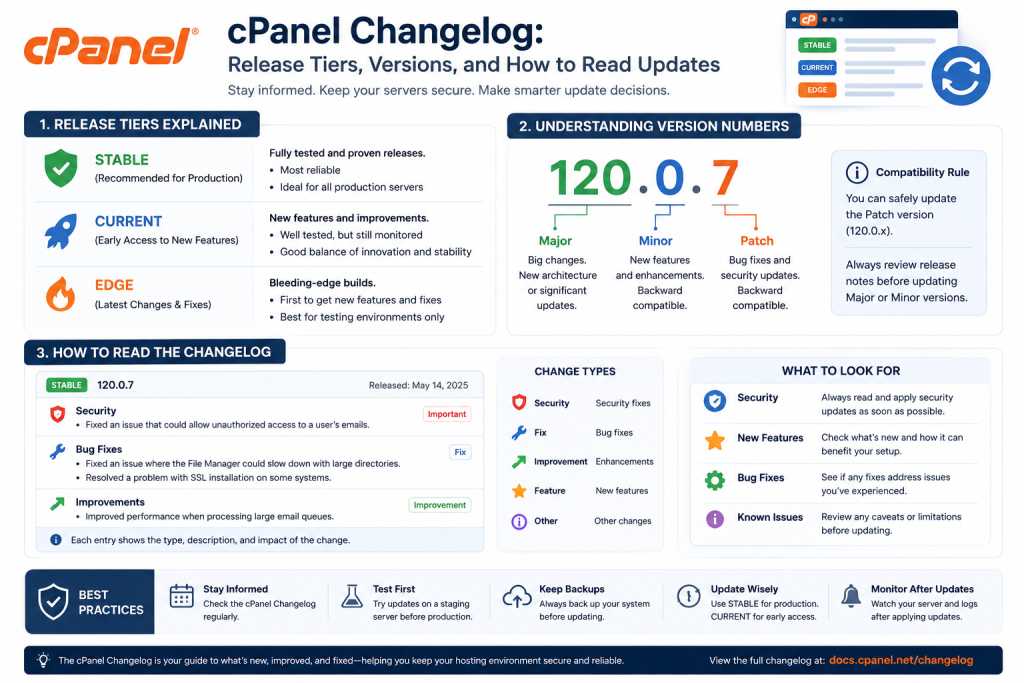
Table of Contents
.answer{background:#e8f1fb;border-left:4px solid #0b5cad;border-radius:0 6px 6px 0;padding:14px 18px;margin:0 0 20px;font-weight:500}
.ai-summary{background:#f0f2f5;border:1px solid #e3e6ea;border-radius:6px;padding:14px 18px;margin:0 0 24px}
.disclosure{font-size:.85rem;color:#5b6270;border:1px dashed #e3e6ea;padding:10px 14px;border-radius:6px;margin:0 0 24px}
.fast-scan{background:#fff;border:1px solid #0b5cad;border-radius:8px;padding:18px 22px;margin:0 0 24px}
.fast-scan h3{margin-top:0;color:#0b5cad}
code{font-family:Consolas,Menlo,monospace;background:#f0f2f5;border:1px solid #e3e6ea;border-radius:4px;padding:1px 6px;font-size:.9em}
pre{background:#f0f2f5;border:1px solid #e3e6ea;border-radius:6px;padding:14px 18px;overflow-x:auto;margin:0 0 20px}
pre code{background:none;border:none;padding:0}
table{width:100%;border-collapse:collapse;margin:0 0 24px;font-size:.95rem}
th,td{border:1px solid #e3e6ea;padding:10px 12px;text-align:left;vertical-align:top}
th{background:#e8f1fb}
.verify{color:#5b6270;font-size:.85rem;font-style:italic}
aside{background:#fdf3e7;border:1px solid #e8d5b8;border-radius:8px;padding:18px 22px;margin:32px 0}
aside h3{color:#8a5a1a;margin-top:0}
.cta{background:#0b5cad;color:#fff;border-radius:8px;padding:22px 24px;text-align:center;margin-top:32px}
.cta a{color:#fff;font-weight:700}
{“@context”:”https://schema.org”,”@type”:”FAQPage”,”mainEntity”:[
{“@type”:”Question”,”name”:”What is the cPanel changelog?”,”acceptedAnswer”:{“@type”:”Answer”,”text”:”The cPanel changelog is the official list of changes, fixes, and new features in each cPanel & WHM release. It is published in the cPanel release notes and documents every version from current back to legacy.”}},
{“@type”:”Question”,”name”:”What are the cPanel release tiers?”,”acceptedAnswer”:{“@type”:”Answer”,”text”:”cPanel release tiers from least to most stable are EDGE, CURRENT, RELEASE, and LTS (Long Term Support). Production servers should run LTS for the best stability and security support.”}},
{“@type”:”Question”,”name”:”Where do I find the cPanel changelog?”,”acceptedAnswer”:{“@type”:”Answer”,”text”:”Browse the changelog at the cPanel release notes portal (docs.cpanel.net / news.cpanel.com). Inside WHM, the cPanel & WHM Updates page shows your current version and tier.”}},
{“@type”:”Question”,”name”:”How often does cPanel release updates?”,”acceptedAnswer”:{“@type”:”Answer”,”text”:”cPanel ships a new version roughly every two to three months, with maintenance and security updates in between. LTS versions receive long-term security patches.”}}
]}
Fast-Scan Summary
- The changelog lists every change per cPanel version: features, fixes, security.
- Four tiers, least to most stable: EDGE, CURRENT, RELEASE, LTS.
- Production servers should run LTS; it gets long-term security patches.
- Find it in the cPanel release notes portal, or check your version in WHM.
- New versions ship roughly every 2-3 months, with security updates between.
The Five cPanel Release Tiers
| Tier | Stability | Use case |
|---|---|---|
| EDGE | Lowest (experimental) | Testing only; never production |
| CURRENT | Early adopter | Trying new features ahead of the crowd |
| RELEASE | Tested, general availability | Hosts that want new features once stable |
| STABLE | Highly tested | Stability-focused environments |
| LTS | Highest (long term support) | Production servers; recommended default |
How cPanel Version Numbers Work
An LTS version keeps its number for a long support window and receives security backports. When LTS moves to a new number, cPanel announces the transition well in advance so you can plan the upgrade.
Need the best price on server licenses?
Get cPanel, DirectAdmin, LiteSpeed & more with instant delivery and 24/7 support.
Where to Find the cPanel Changelog
- SharedLicense cPanel Changelogs Page: every changes, fixes from official source.
- Release notes portal: every version’s changes, fixes, and CVEs.
- WHM → cPanel & WHM Updates: shows your current version, tier, and available updates.
- cPanel News: security advisories and major change announcements.
How to Update cPanel and Track What Changed
/scripts/upcpAfter the update, check WHM → Server Status → Server Information to confirm the new version, then scan the changelog for any breaking changes that affect your stack (PHP default versions, deprecated features, API changes).
What We Tracked: Update-Related Incidents
| Tier in use | Share of update incidents | Typical cause |
|---|---|---|
| EDGE | 54% | Experimental feature broke a customer workflow |
| CURRENT | 23% | Early-release bug not yet patched |
| RELEASE/Stable | 15% | Third-party plugin incompatibility |
| LTS | 8% | Almost always a plugin, not cPanel itself |
FAQ: cPanel Changelog, Answered
What is the cPanel changelog?
What are the cPanel release tiers?
Where do I find the cPanel changelog?
How often does cPanel release updates?
SharedLicense keeps hosting providers running for less with affordable licenses for cPanel, DirectAdmin, LiteSpeed, CloudLinux, JetBackup, Imunify360.
