


Blog
cPanel Ports: The Complete List and Firewall Guide
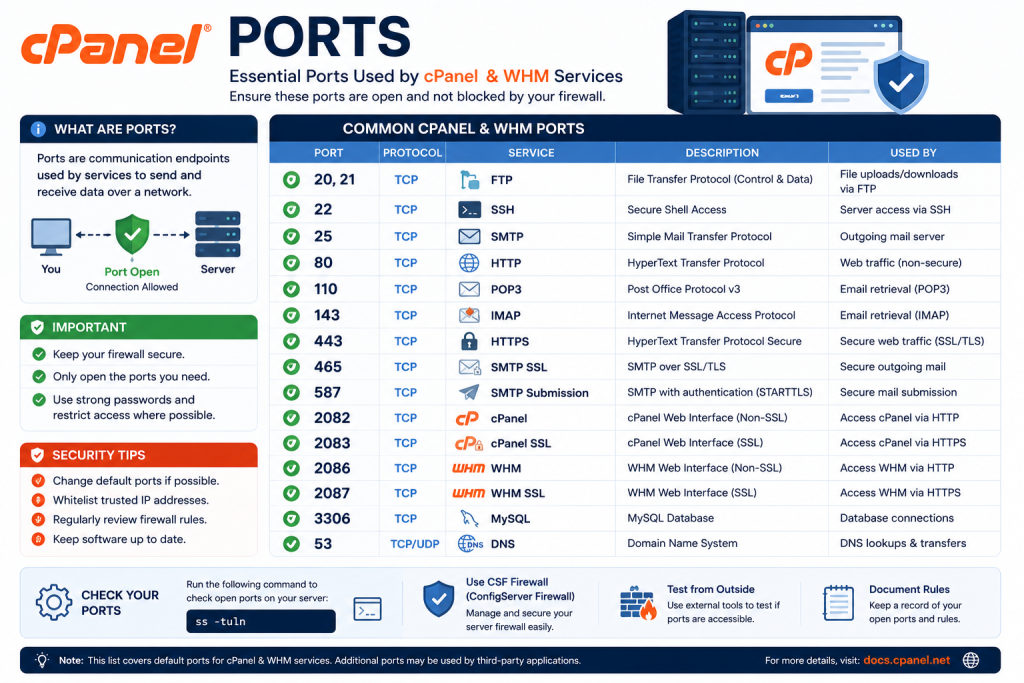
Table of Contents
.answer{background:#e8f1fb;border-left:4px solid #0b5cad;border-radius:0 6px 6px 0;padding:14px 18px;margin:0 0 20px;font-weight:500}
.ai-summary{background:#f0f2f5;border:1px solid #e3e6ea;border-radius:6px;padding:14px 18px;margin:0 0 24px}
.disclosure{font-size:.85rem;color:#5b6270;border:1px dashed #e3e6ea;padding:10px 14px;border-radius:6px;margin:0 0 24px}
.fast-scan{background:#fff;border:1px solid #0b5cad;border-radius:8px;padding:18px 22px;margin:0 0 24px}
.fast-scan h3{margin-top:0;color:#0b5cad}
code{font-family:Consolas,Menlo,monospace;background:#f0f2f5;border:1px solid #e3e6ea;border-radius:4px;padding:1px 6px;font-size:.9em}
pre{background:#f0f2f5;border:1px solid #e3e6ea;border-radius:6px;padding:14px 18px;overflow-x:auto;margin:0 0 20px}
pre code{background:none;border:none;padding:0}
table{width:100%;border-collapse:collapse;margin:0 0 24px;font-size:.95rem}
th,td{border:1px solid #e3e6ea;padding:10px 12px;text-align:left;vertical-align:top}
th{background:#e8f1fb}
aside{background:#fdf3e7;border:1px solid #e8d5b8;border-radius:8px;padding:18px 22px;margin:32px 0}
aside h3{color:#8a5a1a;margin-top:0}
.cta{background:#0b5cad;color:#fff;border-radius:8px;padding:22px 24px;text-align:center;margin-top:32px}
.cta a{color:#fff;font-weight:700}
TL;DR: cPanel itself serves on ports 2082/2083, WHM on 2086/2087, and webmail on 2095/2096 (HTTP/HTTPS pairs). A cPanel server additionally needs 21 (FTP), 22 (SSH), 25/465/587 (SMTP), 53 (DNS), 80/443 (web), 110/995 (POP3S), 143/993 (IMAPS) and 3306 (MySQL) open where those services run. The full table, ready-to-paste CSF firewall rules, and the port-mistake tickets we see most are below.
{“@context”:”https://schema.org”,”@type”:”FAQPage”,”mainEntity”:[
{“@type”:”Question”,”name”:”What port does cPanel use?”,”acceptedAnswer”:{“@type”:”Answer”,”text”:”cPanel uses port 2083 (HTTPS) for the control panel, 2087 for WHM, and 2096 for webmail. The HTTP equivalents are 2082, 2086, and 2095.”}},
{“@type”:”Question”,”name”:”What is the difference between port 2082 and 2083?”,”acceptedAnswer”:{“@type”:”Answer”,”text”:”2082 is the insecure HTTP cPanel port and 2083 is the secure HTTPS port. On a correctly configured server, 2082 redirects to 2083. Always log in on 2083.”}},
{“@type”:”Question”,”name”:”Which ports do I open in the firewall for cPanel?”,”acceptedAnswer”:{“@type”:”Answer”,”text”:”Open 2083, 2087, 2096, 80, 443, 21 (FTP), 22 (SSH), 25, 26, 587, 465, 993, and 995. Block the insecure 2082/2086/2095 if you want HTTPS-only access.”}},
{“@type”:”Question”,”name”:”How do I change the cPanel port?”,”acceptedAnswer”:{“@type”:”Answer”,”text”:”cPanel does not officially support changing the default service ports. Use a firewall, reverse proxy, or VPN restriction instead of changing the ports themselves.”}}
]}
Disclosure: This page contains affiliate links. If you buy a cPanel license through SharedLicense, we may earn a commission at no extra cost to you.
Need the best price on server licenses?
Get cPanel, DirectAdmin, LiteSpeed & more with instant delivery and 24/7 support.
Fast-Scan Summary
- cPanel panel: 2083 (HTTPS), 2082 (HTTP). WHM: 2087 / 2086. Webmail: 2096 / 2095.
- Web: 80 and 443. FTP: 21 (plus passive range). SSH: 22.
- Mail: 25, 26, 587, 465 (SMTP), 110, 995 (POP3), 143, 993 (IMAP).
- Always use the HTTPS ports; block the HTTP variants in CSF if you want HTTPS-only.
- cPanel does not support changing service ports. Restrict access with a firewall instead.
The Full cPanel Port Table
| Service | Secure port (TLS) | Insecure port | Friendly redirect |
|---|---|---|---|
| cPanel (end user) | 2083 | 2082 | /cpanel |
| WHM (admin/reseller) | 2087 | 2086 | /whm |
| Webmail | 2096 | 2095 | /webmail |
| cPanel Web Disk (CalDAV/CardDAV) | 2078 | 2077 | – |
| cPanel DNS cluster | – | 2087 (cpsrvd), 53 DNS | – |
Web, FTP, SSH, and Mail Ports
| Service | Port(s) | Notes |
|---|---|---|
| HTTP / HTTPS | 80 / 443 | Required for AutoSSL validation and all web traffic |
| FTP / SFTP | 21 / 22 | Open the passive FTP range (e.g. 30000-35000) in CSF |
| SSH | 22 | Move to a non-default port and restrict by IP |
| SMTP (incoming/outgoing) | 25, 26, 587, 465 | 465 = SMTPS, 587 = submission |
| POP3 / IMAP | 110, 143, 993, 995 | 993 and 995 are the TLS variants |
| DNS | 53 (TCP+UDP) | Only if running a nameserver |
Firewall Rules for a cPanel Server (CSF)
Typical csf.conf TCP inbound list for a full cPanel server:
TCP_IN = "20,21,22,25,26,53,80,110,143,443,465,587,993,995,2077,2078,2082,2083,2086,2087,2095,2096,30000:35000"To force HTTPS-only panel access, remove 2082, 2086, and 2095 from TCP_IN. Then in WHM’s Tweak Settings, disable “Redirect HTTP to HTTPS” only if you are already handling it upstream.
What We Tracked: Port-Related Access Tickets
| Port issue | Share of access tickets | Root cause |
|---|---|---|
| 2083 blocked by upstream firewall | 46% | Customer’s corporate network blocks non-standard ports; advise /cpanel over 443 proxy or VPN |
| Passive FTP range not open | 33% | CSF passive range missing or mismatched with PureFTPd config |
| Mail ports blocked outbound | 21% | Provider blocks 25; switch to SMTP relay or 587 |
FAQ: cPanel Ports, Answered
What port does cPanel use?
What is the difference between port 2082 and 2083?
Which ports do I open in the firewall for cPanel?
Related Guides
SharedLicense keeps hosting providers running for less with affordable licenses for cPanel, DirectAdmin, LiteSpeed, CloudLinux, JetBackup, Imunify360.
